Lender Notification API Overview
Use Case
This guide defines the webhook specification for lenders integrating with Fundiin. Lenders notify Fundiin of loan lifecycle events, disbursement, Payment Receipt, Repayment Allocation, and Installment Schedule updates so Fundiin can keep the customer experience current.
This contract is designed for a multi-lender integration. The endpoint path does not include a specific lender name. Fundiin identifies the lender by Client-Id and lenderCode; Signature authenticates the exact request body.
Integration Flow
Lender-provided data populates the Fundiin App repayment screens in real time after each webhook notification. The integration sequences for both tiers are shown below.
TRIAL integration sequence
The sequence below covers loan disbursement and repayment state updates at loan level. Only Loan Application Status and Installment Schedule (loan summary) are exchanged.

STANDARD integration sequence
The sequence below extends TRIAL with installment-level schedule, Payment Receipt, and Repayment Allocation events for full reconciliation.
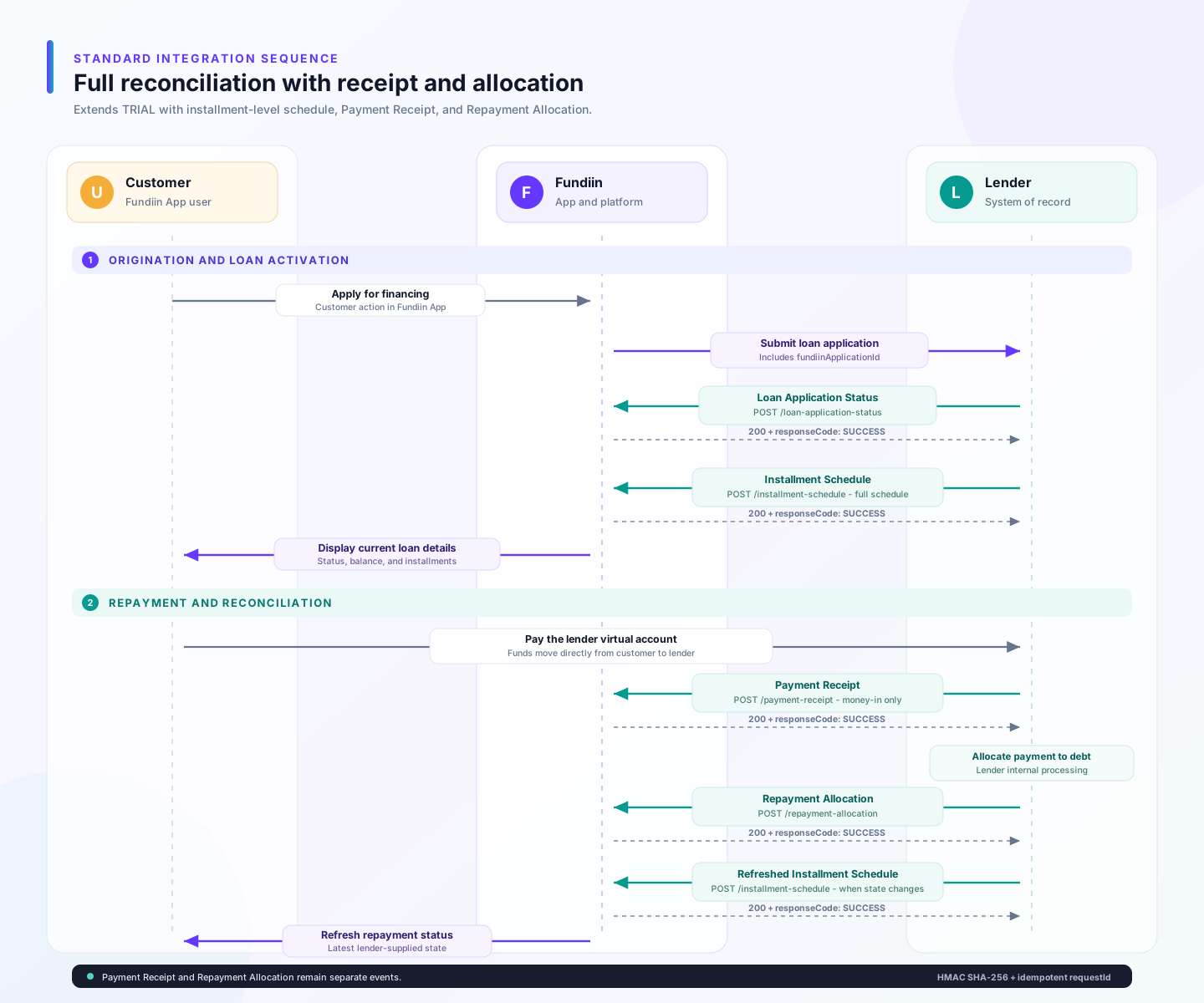
Key points for lender integration:
- Loan Sync: After activation and after each repayment allocation, the lender sends Installment Schedule Notification to keep Fundiin synchronized with the latest loan state (summary-only for
TRIAL, full schedule list forSTANDARD). - Repayment Events (STANDARD only): Payment Receipt Notification captures the customer transfer (money-in only). Debt clearance is confirmed via Repayment Allocation Notification.
Each webhook is acknowledged independently. HTTP 200 with responseCode: SUCCESS confirms that Fundiin accepted and processed that webhook request; it does not combine or replace the next event in the flow.
- Generate a new
requestIdfor each new webhook event. - Reuse the same
requestIdwhen retrying the same event. - Keep
fundiinApplicationIdunchanged across events for the same Fundiin loan application. - Keep payment receipt and repayment allocation as separate events.
- Sign the exact raw request body with HMAC SHA-256.
Base URL
| Environment | URL |
|---|---|
| Sandbox | https://api-qa.fundiin.vn |
| Production | https://api.fundiin.vn |
Webhook APIs
| Webhook | Method | Endpoint | Integration | Purpose |
|---|---|---|---|---|
| Loan Application Status Notification | POST | /lender/open/notify/loan-application-status | TRIAL + STANDARD | Notify Fundiin about loan application, contract, disbursement, activation, and closure lifecycle updates. |
| Installment Schedule Notification | POST | /lender/open/notify/installment-schedule | TRIAL + STANDARD | Sync the latest loan summary and, for STANDARD, the full installment schedule. |
| Payment Receipt Notification | POST | /lender/open/notify/payment-receipt | STANDARD only | Notify Fundiin that the lender has received a customer payment. |
| Repayment Allocation Notification | POST | /lender/open/notify/repayment-allocation | STANDARD only | Notify Fundiin about allocation of a received payment to one or more installments. |
Security
Each webhook request must be signed by the lender using HMAC SHA-256.
Request Headers
| Header Name | Type | Required | Description |
|---|---|---|---|
| Content-Type |  | application/json; charset=UTF-8 | |
| Client-Id | | Partner ID assigned by Fundiin for the lender. | |
| Signature | | HMAC SHA-256 signature in hexadecimal format. |
Signature Calculation
Signature = HMAC_SHA256(<raw request body>, secretKey)
The lender must:
- Convert the request body to a JSON string.
- Compute the HMAC SHA-256 hash using the shared
secretKey. - Encode the hash in hexadecimal format.
- Send the result in the
Signatureheader.
See HMAC Signatures for implementation examples.
The JSON string used to create the signature must be the same body sent in the HTTP request. Avoid reformatting or reordering fields after calculating the signature.
Common Request Fields
| Parameter | Type | Required | Description |
|---|---|---|---|
| requestId | | Unique webhook request ID. Reuse the same value when retrying the same event. | |
| fundiinApplicationId | | Fundiin loan application ID passed to the lender in the original application request. | |
| lenderCode | | Lender code assigned by Fundiin. | |
| requestingDatetime | | Event datetime. Format: yyyy-MM-ddTHH:mm:ss+0700. |
requestId identifies the webhook delivery event and is used for retry idempotency. fundiinApplicationId identifies the original Fundiin loan application and stays the same across all webhook events for that application.
Loan Identification
Use one lender-side identifier across webhook payloads:
lenderReferenceId- Stable application/loan identifier generated by the lender. Send the same value for the same customer application or loan across webhook events.contractNumber- Secondary reference. Included for reconciliation against contract documents.
lenderReferenceId is required in Loan Application Status Notification and Installment Schedule Notification. It is conditional in Payment Receipt Notification and Repayment Allocation Notification only when a payment event can arrive before the lender reference is available.
Common Response
All webhooks share the same response structure. Fundiin returns HTTP 200 with the following body.
| Parameter | Type | Required | Description |
|---|---|---|---|
| responseCode | | SUCCESS or FAILED. | |
| responseMessage | | Response message. Use Success when responseCode = SUCCESS. |
{
  "responseCode": "SUCCESS",
  "responseMessage": "Success"
}
If the lender does not receive HTTP 200 within the timeout window, retry the request with the same requestId. Lenders must use requestId as the idempotency key to avoid double-processing.